
What it does
Remote field encoders push their stream in over the internet — SRT natively, or UDP MPEG-TS/RTMP/RIST via an ffmpeg bridge — and OmniBridge routes each one to a slot on a local production destination (vMix or OBS) and, optionally, sends a program/return feed back out to the field, or out to an external UDP-TS/RTMP/RIST destination (a streaming platform like YouTube over RTMP, or a hardware decoder). All controlled from a web dashboard, live. Built as a single Rust binary (Axum + srt-tokio) serving an embedded React dashboard, so there's nothing separate to install or keep running alongside it.
Return/program-out feeds route back the other way, from a destination to any source — the same matrix, either direction.
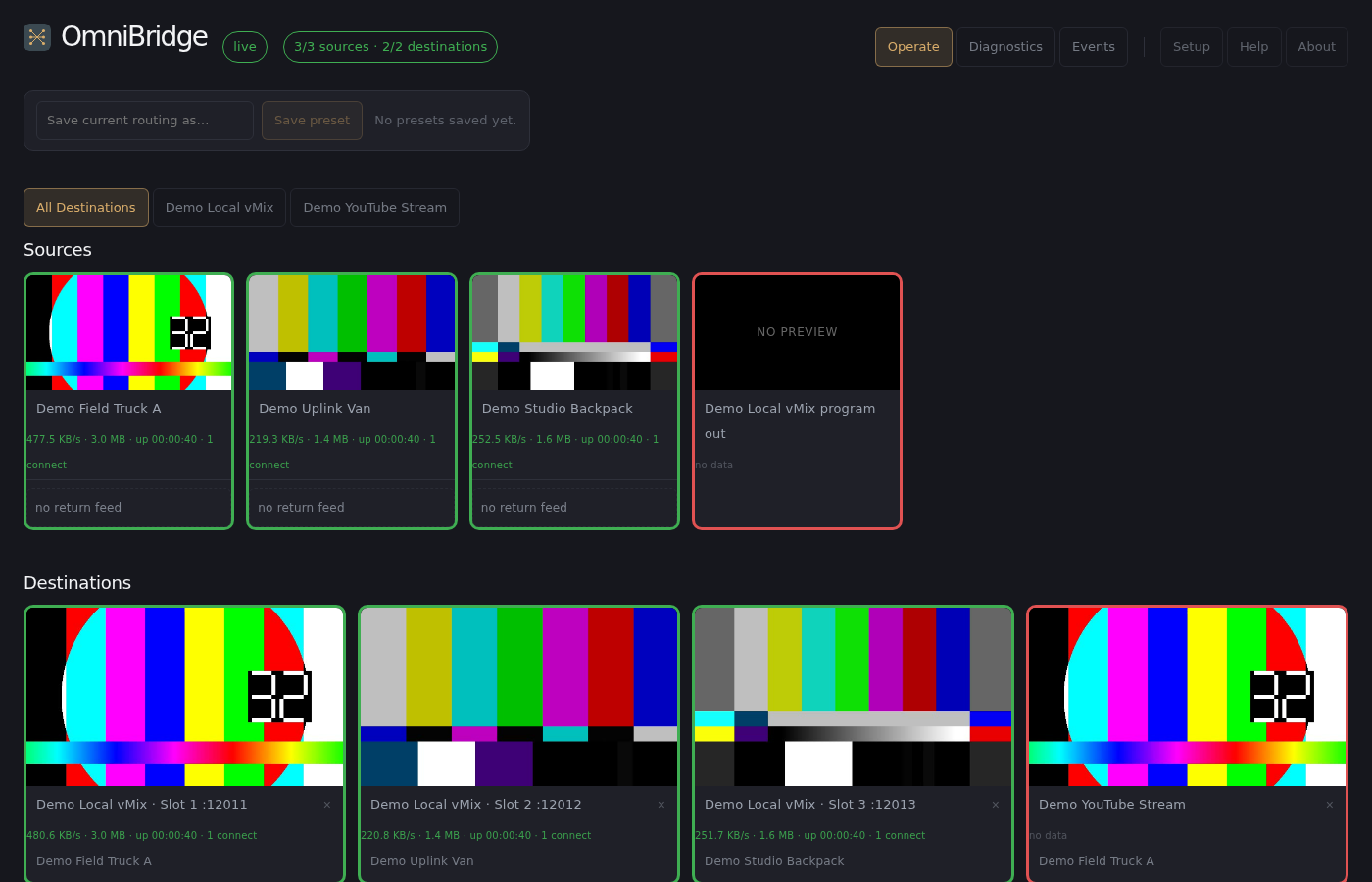
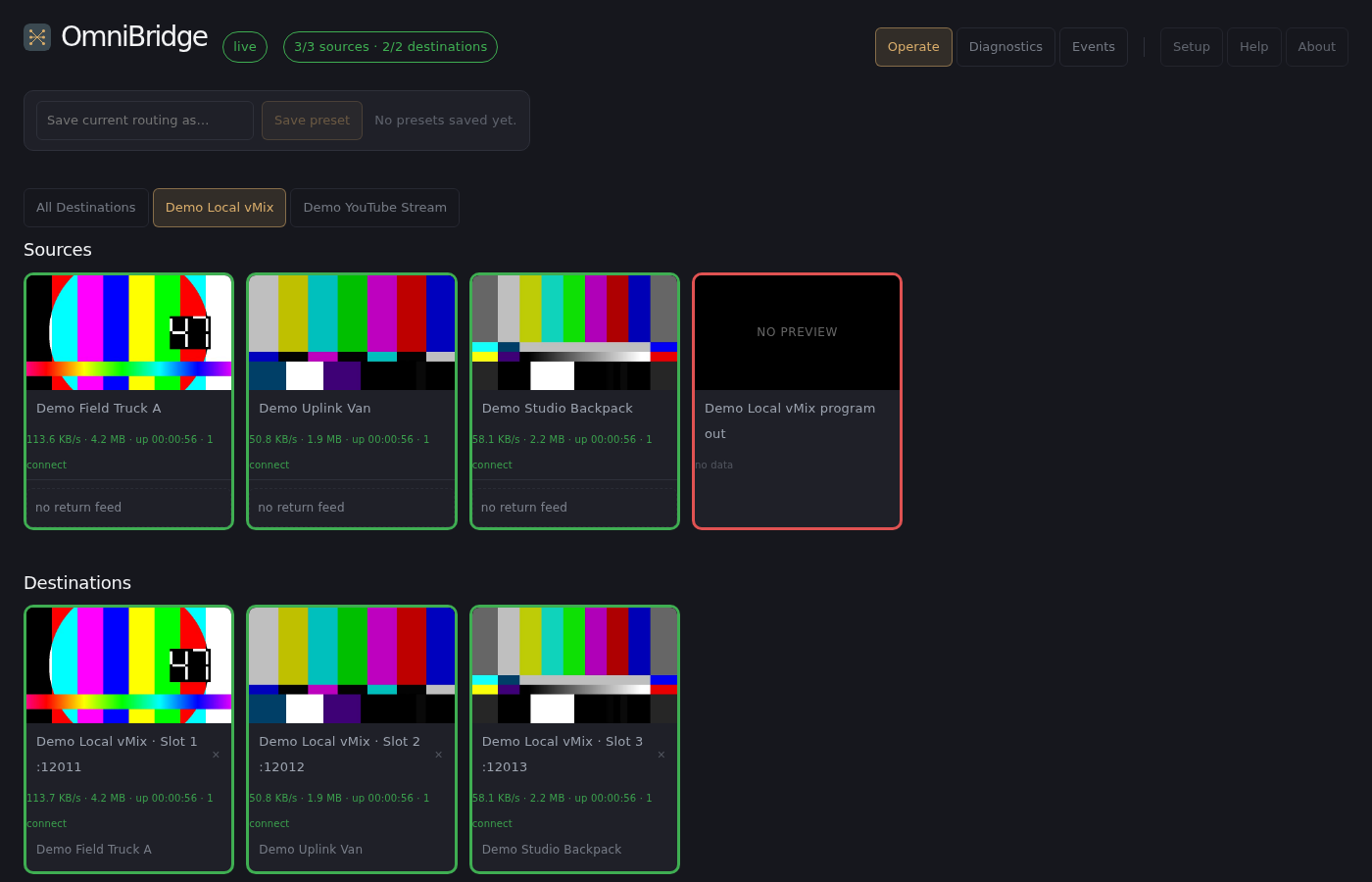
Live dashboard with simulated feeds — three demo sources ("Demo Field Truck A," "Demo Uplink Van," "Demo Studio Backpack") routed into a demo local destination's three slots (left), and the same setup with just that one destination selected via the per-destination Operate tabs (right) — sources still show all of them, only the destinations grid narrows.
The dashboard's nav bar groups six views into two clusters: live-ops pages you touch during a show — Operate (the routing matrix), Diagnostics, and Events (a timestamped audit log of every route/preset change and connect/disconnect, so you can answer "what changed and when" after the fact) — and a set-apart cluster for occasional-use pages — Setup (which also covers the gateway's network interface and other global config), Help, and About. Every view is one click away; nothing is behind a menu.
Why OmniBridge
- Priced for the room you're actually in.Enterprise broadcast SRT gateways are typically sold as custom-quoted, cloud-metered infrastructure aimed at network-scale budgets. OmniBridge starts at $399/yr for 3 sources and 1 destination — built for a single production, not a broadcast network.
- Self-hosted, not cloud-routed.Cloud contribution platforms send your video through their infrastructure and bill monthly per stream. OmniBridge is one binary that runs on your own network — your feeds never leave your control, and there's no recurring cloud fee stacked on top of the license.
- No install-count penalty.Most licensing models charge per seat or per install. OmniBridge licenses by usage — how much you're actually routing — so running it redundantly, on a backup machine, or across as many boxes as you want costs nothing extra.
- Built for the operator at the switcher, not a network engineer.Drag-and-drop routing with live thumbnails and tally lights, not a config file or a CLI — whoever's already running vMix or OBS on show night can operate it directly.
- Real per-connection diagnostics, not a ping.Bitrate, RTT, packet loss, retransmits, and reconnect history per source and destination — see exactly what's wrong with a flaky feed instead of just knowing something is.
- Multi-protocol without extra hardware.SRT natively, or UDP MPEG-TS/RTMP/RIST through a built-in
ffmpegbridge — bring the encoder you already have instead of buying a converter box to match one vendor's protocol.
How it fits into a production
- Sources are always callers.A field encoder makes an outbound connection to the gateway's public IP — SRT natively, or UDP MPEG-TS/RTMP/RIST through an
ffmpegbridge — the gateway never needs to reach out to a source, so there's nothing to open on the field side. - Local destinations are always listeners.The gateway dials out to push a routed source into a slot and to pull program output back — no inbound firewall rule needed from the internet to your production network, only from the gateway on your local network.
- Presets.Save a named routing snapshot ("cut all sources to their default slots") and re-apply it in one action, the same way a broadcast router's salvo works.
- Per-destination Operate tabs.See every source at all times, but narrow the destinations grid to just one production system's slots with a tab — useful when one operator owns one destination but still needs the full source list to route from.
- Live status, not persisted state.Every status dot on the dashboard is computed live from the real connections the relay engine is holding — reachability is never guessed from stale config.
- Your routing survives a restart — status doesn't have to.Sources, destinations, and every route are written to disk the moment you set them and reloaded automatically the next time the gateway starts — a crash or reboot mid-show never means re-patching everything by hand. Only live connection status (above) resets and re-establishes itself from scratch.
- Live thumbnails.Every source and destination tile shows a preview thumbnail, refreshed every 5 seconds, inside a tally-colored border — see what's coming in and going out at a glance without switching to a separate monitor.
- Per-endpoint diagnostics.A dedicated Diagnostics view lists every source and station with color-coded connection status, current route, current/average bitrate, uptime, reconnect count, RTT/loss/retransmits, and last error — expand a row for exact timestamps, so a bad connection is something you can actually diagnose, not just a red dot.
- Reconnects on its own.A local destination going offline overnight, or a source's field kit powering down between shoots, isn't an error — the relay keeps retrying with a fixed backoff and reconnects the moment the other side comes back.
Under the hood
Rust backend (Axum + srt-tokio), React + TypeScript dashboard (Vite), WebSocket for live state — the whole matrix's connection status broadcasts to the dashboard on every change and on a fixed heartbeat, so it reflects reality even when nothing changed through the UI.
Installing on Debian/Ubuntu
Every tagged release publishes to our self-hosted, GPG-signed apt repo: sudo apt install omnibridge after adding repo.jpps.us's stable channel. Installs a systemd service that starts automatically — no interactive configuration, everything's set up through the dashboard once it's running. Full instructions are in the README.
Pricing
Licensed by usage — how many sources feed in and how many destinations you route to — not by seat or install count. One-time payment per term, no recurring subscription.
OmniBridge
- 3 sources, 1 destination$399/yr
- Each additional source or destination+$50/yr
- 2-year term$734 (~8%/yr off)
- 3-year term$998 (~17% off)
- 5-year term$1,456 (~27% off)
- Trial — 3 sources, 1 destination, 30 daysFree
Concurrent installs are unlimited at any source/destination count, including the trial — run it on as many machines as you want; you're paying for how much you're actually routing, not how many boxes it's installed on. Self-service trial, no credit card. For an exact quote at your source/destination count, or to buy, see the store.